
Foundry API

Submit protein sequences for experimental characterization and retrieve results programmatically.
The Foundry API connects your computational pipeline to Adaptyv Bio’s protein testing platform. You submit sequences, the lab runs experiments, and you retrieve binding data, thermostability measurements, or expression levels via a simple webhook.

How to Connect

You or your agent can find all information via
curl https://foundry-api-public.adaptyvbio.com/api/v1/openapi.json
Every request aside from getting the openapi.json requires a bearer token:
curl https://foundry-api-public.adaptyvbio.com/api/v1/targets?limit=3 \
  -H "Authorization: Bearer $FOUNDRY_API_TOKEN"
Tokens are scoped to your organization and role. See Getting an API token below for the full walkthrough, and always store your token in an environment variable rather than committing it to source control.

Getting an API token

API tokens live in the Foundry portal under Organization → Settings → Tokens. Existing tokens for your organization show their owner, role, status, creation date, and expiry. The Create Token button is in the top right.
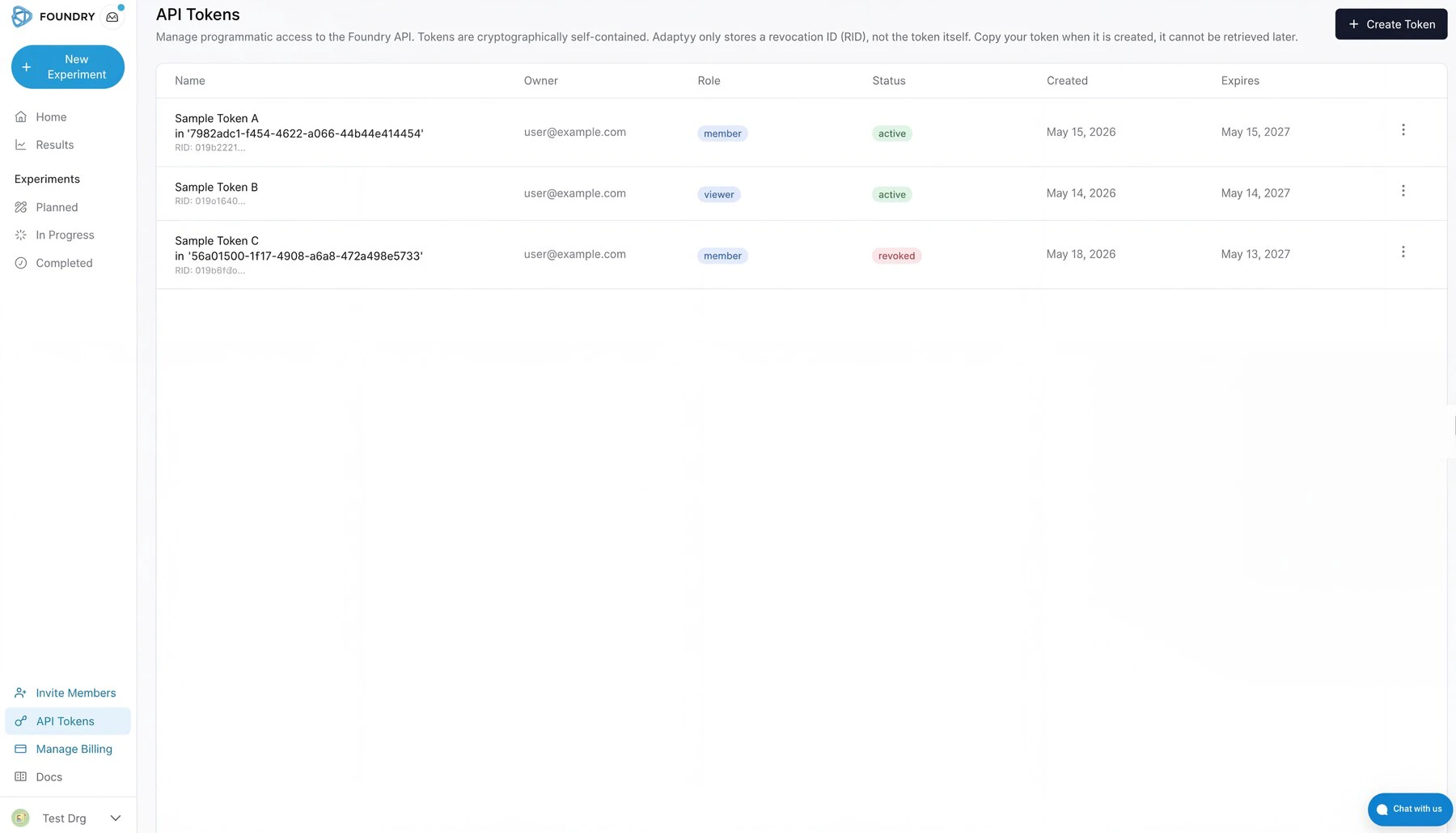
Foundry portal screenshot: the API Tokens settings page, showing the list of existing tokens (name, owner, role, status, created and expires dates) and the Create Token button.
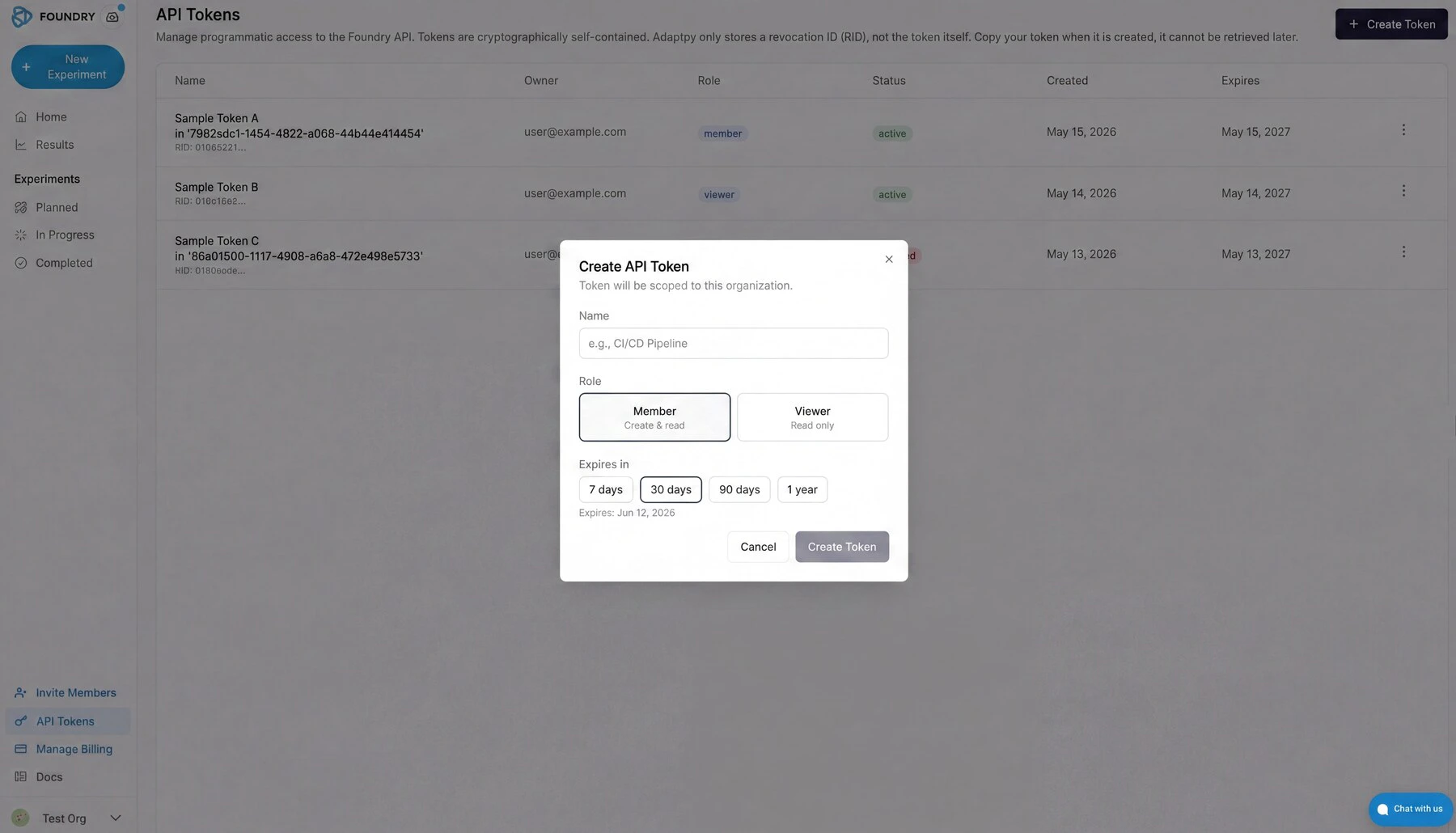
Creating a token asks for three things: a name (for your own bookkeeping), a role, and an expiry. Pick Member if you need to create or modify experiments, Viewer for read-only access. Expiry runs from seven days to one year; pick the shortest window that still covers your use case.
Foundry portal screenshot: the Create API Token modal, with fields for name, role (Member or Viewer), and expiry (7 days, 30 days, 90 days, 1 year).
The token value is shown once, at creation time. Copy it before closing the dialog — Adaptyv only stores a revocation ID, not the token itself, and there is no way to retrieve it later. Revoking a token from the same page invalidates it immediately for both REST API and MCP use.

What the API covers

The API exposes five resource groups. Together, they support the full experiment lifecycle: browse targets, submit sequences, track progress, and collect results. Targets: Browse our catalog of available target antigens programmatically. You can filter by name, vendor, or self-service availability. Targets for which we have a calibrated self-service price allow instant cost estimates and automated checkout. Experiments: Create experiments by specifying a target and one or more protein sequences. Five experiment types are available:
TypeWhat it measuresRequires target
screeningBinding yes/no against a target antigen (BLI or SPR)Yes
affinityBinding kinetics: K_D, k_on, k_off (BLI or SPR)Yes
thermostabilityMelting temperature via differential scanning fluorimetryNo
fluorescenceFluorescence intensity of protein variantsNo
expressionExpression yield of protein constructsNo
For more information about each see the experiment types documentation. Sequences: List, inspect, and add sequences to draft experiments. Each sequence is a single amino acid string; multi-chain formats (Fab heavy:light) use a colon separator. Results: Retrieve experimental data once the lab completes your run. Results include binding classifications, kinetic constants, melting temperatures, or expression levels, depending on experiment type. Quotes and invoices: Review pricing, confirm quotes, and access invoices for your experiments.

Experiment lifecycle

The diagram below shows how an experiment moves from draft to delivered results. You control the transitions on the left (create, submit, confirm); everything on the right happens in the lab. API status values and what they mean:
StatusWho actsWhat is happening
DraftYouExperiment is editable. No cost commitment.
WaitingForConfirmationAdaptyvUnder review; quote is being prepared.
QuoteSentYouQuote ready — review and confirm to proceed.
WaitingForMaterialsAdaptyvGene fragments and target antigen ordered.
InQueueAdaptyvMaterials arrived; queued for the lab.
InProductionAdaptyvAssay running.
DataAnalysisAdaptyvRaw data processing and QC.
InReviewAdaptyvFinal validation before release.
DoneYouResults available via the API.
CanceledEitherExperiment canceled (possible from Draft or WaitingForConfirmation).
You can poll status at any time with GET /experiments/{id}. The results_status field tells you whether results are none, partial, or all without fetching the full dataset. To receive push notifications instead of polling, pass a webhook_url when creating the experiment.

Quick example

This snippet creates a binding screen against a target from the catalog:
export FOUNDRY_API_URL="https://foundry-api-public.adaptyvbio.com/api/v1/openapi.json"
# 1. Find a target
curl "$FOUNDRY_API_URL/targets?search=EGFR&selfservice_only=true&limit=1" \
  -H "Authorization: Bearer $FOUNDRY_API_TOKEN"

# Response includes target_id, pricing, and catalog details
# 2. Create the experiment
curl -X POST "$FOUNDRY_API_URL/experiments" \
  -H "Authorization: Bearer $FOUNDRY_API_TOKEN" \
  -H "Content-Type: application/json" \
  -d '{
    "name": "EGFR Binding Screen — Round 3",
    "experiment_spec": {
      "experiment_type": "screening",
      "method": "bli",
      "target_id": "019a03da-b87f-7902-81d5-24da9754bdde",
      "sequences": {
        "candidate_1": "EVQLVESGGGLVQPGGSLRLSCAASGFNIKDTYIHWVRQAPGKGLEWVARIYPTNGYTRYADSVKGRFTISADTSKNTAYLQMNSLRAEDTAVYYCSRWGGDGFYAMDYWGQGTLVTVSS",
        "candidate_2": "QVQLVQSGAEVKKPGASVKVSCKASGYTFTNYGISWVRQAPGQGLEWMGWISAYNGNTNYAQKLQGRVTMTTDTSTSTAYMELRSLRSDDTAVYYCARGGYSSSWYFDYWGQGTLVTVSS"
      }
    }
  }'

# Response:
# {
#   "experiment_id": "019d4a2b-...",
#   "experiment_code": "ORG-001-123",
#   "status": "draft",
#   "costs": { ... }
# }
# 3. Submit for processing
curl -X POST "$FOUNDRY_API_URL/experiments/019d4a2b-.../submit" \
  -H "Authorization: Bearer $FOUNDRY_API_TOKEN"
# 4. Check results (once the experiment reaches "done")
curl "$FOUNDRY_API_URL/experiments/019d4a2b-.../results" \
  -H "Authorization: Bearer $FOUNDRY_API_TOKEN"

Filtering and sorting

List endpoints accept filter, sort, and search query parameters. Filtering uses an s-expression syntax, in order to make it easier for you (and your agents) to compose complex filter conditions. Wrap the expression in the filter parameter:
GET /experiments?filter=eq(status,"draft")
GET /experiments?filter=and(eq(status,"done"),gte(created_at,"2026-01-01"))
Available operators: eq, neq, gt, gte, lt, lte, contains, between, in, is_null, is_not_null. Combine with and, or, not. Sorting uses asc(field) or desc(field):
GET /experiments?sort=desc(created_at)
GET /results?sort=asc(created_at),desc(binding_score)
Search is a free-text substring match on name fields:
GET /targets?search=HER2
Pagination uses limit (1—100, default 50) and offset as usual:
GET /experiments?limit=10&offset=20

Webhooks

Pass a webhook_url when creating an experiment to receive status-change notifications:
{
  "name": "Screen with webhook",
  "webhook_url": "https://your-server.com/foundry-hook",
  "experiment_spec": { ... }
}
The webhook delivers a POST with the experiment ID, previous status, and new status whenever the experiment transitions.

Cost estimates

Before committing to an experiment, you can get a cost estimate:
curl -X POST "$FOUNDRY_API_URL/experiments/cost-estimate" \
  -H "Authorization: Bearer $FOUNDRY_API_TOKEN" \
  -H "Content-Type: application/json" \
  -d '{
    "experiment_spec": {
      "experiment_type": "screening",
      "method": "bli",
      "target_id": "019a03da-b87f-7902-81d5-24da9754bdde",
      "sequences": {
        "s1": "EVQLVESGGGLVQPGG..."
      }
    }
  }'
The response breaks down assay costs and material costs separately, in USD cents.

SDKs

Official Python SDK: adaptyv-sdk.
from adaptyv_sdk import AdaptyvClient
import os

client = AdaptyvClient(api_key=os.environ["ADAPTYVBIO_API_TOKEN"])
experiments = client.experiments.list(limit=5)

Using the API from Claude and other AI assistants

The same endpoints are exposed as MCP tools at https://foundry-mcp.adaptyv.bio/mcp/. Point Claude Code, Claude Desktop, Cursor, or your own MCP-aware client at that URL with your Foundry token in the Authorization header, and the agent calls the API for you in plain English. See MCP Server for the connection details and a walkthrough of what it enables.